

Where does a 360° camera system store recordings? Check these rules before you need a clip
 CarMate Workshop
Where does a 360° camera system store recordings? Check these rules before you need a clip
After a scrape or parking incident, you may open the 360° camera app expecting to find one continuous video. On the system documented in the owner's knowledge base, that is not how storage works.
The practical answer: this setup writes four-channel recordings to USB0 in three-minute TS files. When space runs low, it removes the oldest unlocked recordings first. If a clip matters, copy the surrounding files to another drive and confirm that they actually play.
Four views do not mean permanent storage
The documentation lists 720p or 1080p four-channel recording. The recording list distinguishes normal and locked items, while the playback screen shows four views.
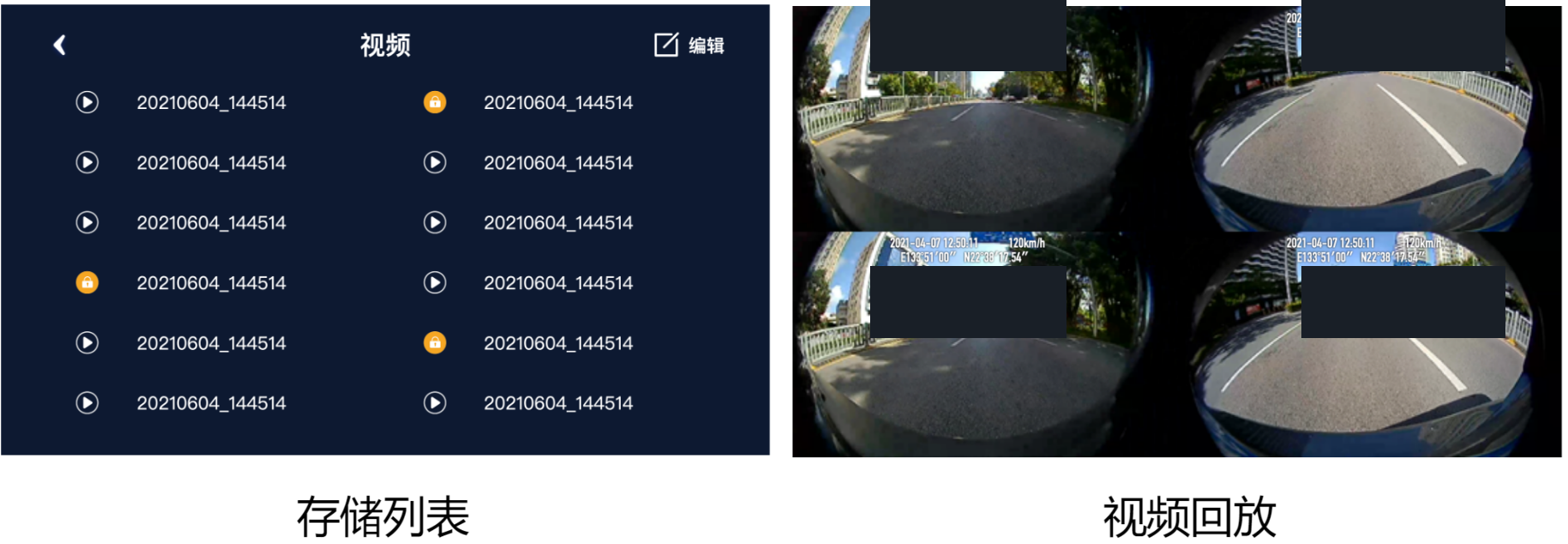
图片说明:A recording list, lock icons and four-view playback from one sample system; only the interface and entry point are evidenced.
That screen proves the app has a recording list, lock markers and a four-view playback entry. It does not prove every file is complete, nor does it confirm the actual encoded resolution or bitrate.
Save more than one three-minute file
An event can fall across a segment boundary. Copy the file containing the event, plus the segment before and after it. Then open each file on a computer. Seeing a filename in the head unit is not the same as verifying the recording.
Do not remove the USB drive while recording. The documented setup also requires more than 1 GB of free space. Power loss, a failing drive or insufficient space may leave incomplete files.
Does this apply to every 360° system?
No. These rules apply only to the documented 360° app and its USB0/4-pin storage arrangement. Other boards and apps may use different folders, formats and overwrite rules.
The useful habit is simple: make a short parked test recording, locate the files, check the segment length and play them back before you ever need the footage.
 Superbox Review
Install guides, diagnostics and common head-unit traps. Take the fix or leave it.
LV6 Grade
336 Fans
1044 Likes
11035 Experience